


Don’t switch. Add WolfStack on top of what you already run.
WolfStack is a single Linux binary that installs on the bare-metal servers you already have — Ubuntu, Debian, RHEL, Rocky, Alma, Mint. No hypervisor OS to install, no reformat, no rebuild, no downtime on whatever’s already running. Most teams who use it didn’t throw anything away: they kept their bare-metal hardware, their Proxmox boxes, their Docker hosts, their Kubernetes clusters — and added WolfStack as the single dashboard for all of it.
Below: what stays, what you gain, for each of the four setups people usually arrive from.
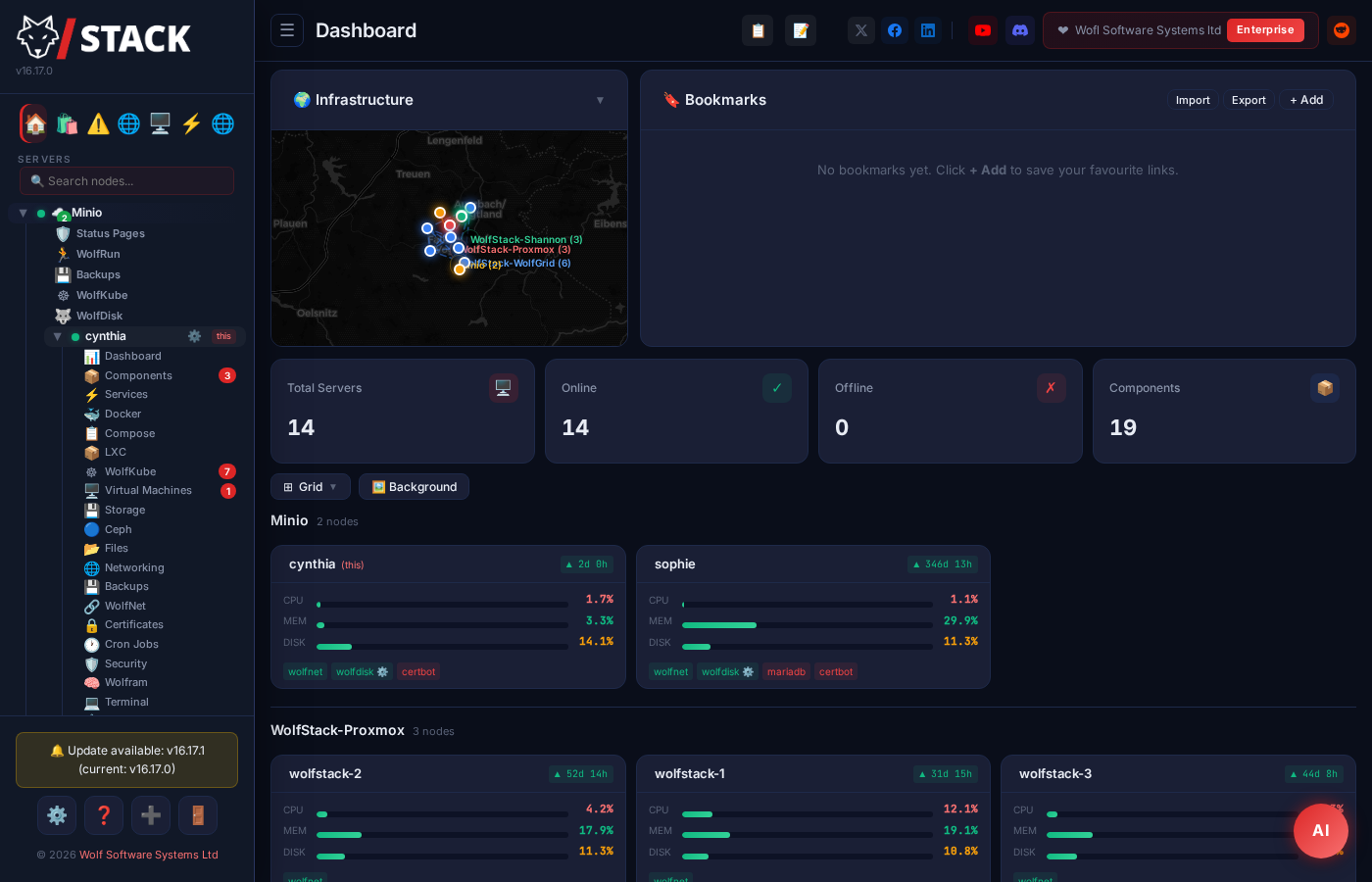
WolfStack on your bare-metal Linux servers
No hypervisor. No special distro. No reformat. WolfStack is one binary you drop onto a Linux server — a bare-metal box in your rack, a dedicated VPS, an Intel NUC under a desk, an old workstation, a cloud instance you SSHed into five minutes ago. From the moment it’s running, that machine becomes a dashboard for itself and for every other server you point it at.
Runs on the metal you already own. Tested on Ubuntu, Debian, Linux Mint, RHEL, Rocky, AlmaLinux. Works on x86_64 and ARM64. Deployable on hardware ranging from a Raspberry Pi to a 64-core Xeon — same binary, same UI.
What stays
- Your existing distro — nothing to reinstall
- Your kernel, your systemd, your
apt/dnfpackages - Your existing Docker, libvirt, LXC if you have them
- Your network config, firewall, SSH access
- The hardware itself — no licence per socket, no “supported HCL”
What you gain
- Browser dashboard for the box and everything on it — CPU, memory, disks, network, processes
- Create Docker containers, LXCs, KVM VMs from a UI without touching
virshorlxc-create - Cluster multiple bare-metal nodes — no master, no etcd, just nodes that find each other
- Encrypted mesh networking (WolfNet) between your boxes, even across the public internet
- Backups, alerting, and a status page that work on day one
The point: The Linux server you already paid for is enough. WolfStack turns it into a managed platform without taking it down or replacing the OS.
WolfStack alongside Kubernetes
Keep your K8s cluster doing what it’s good at. Add WolfStack so you stop YAML-ing for things that don’t need it — and so the rest of your fleet (VMs, LXCs, plain Docker hosts) shows up in the same dashboard.
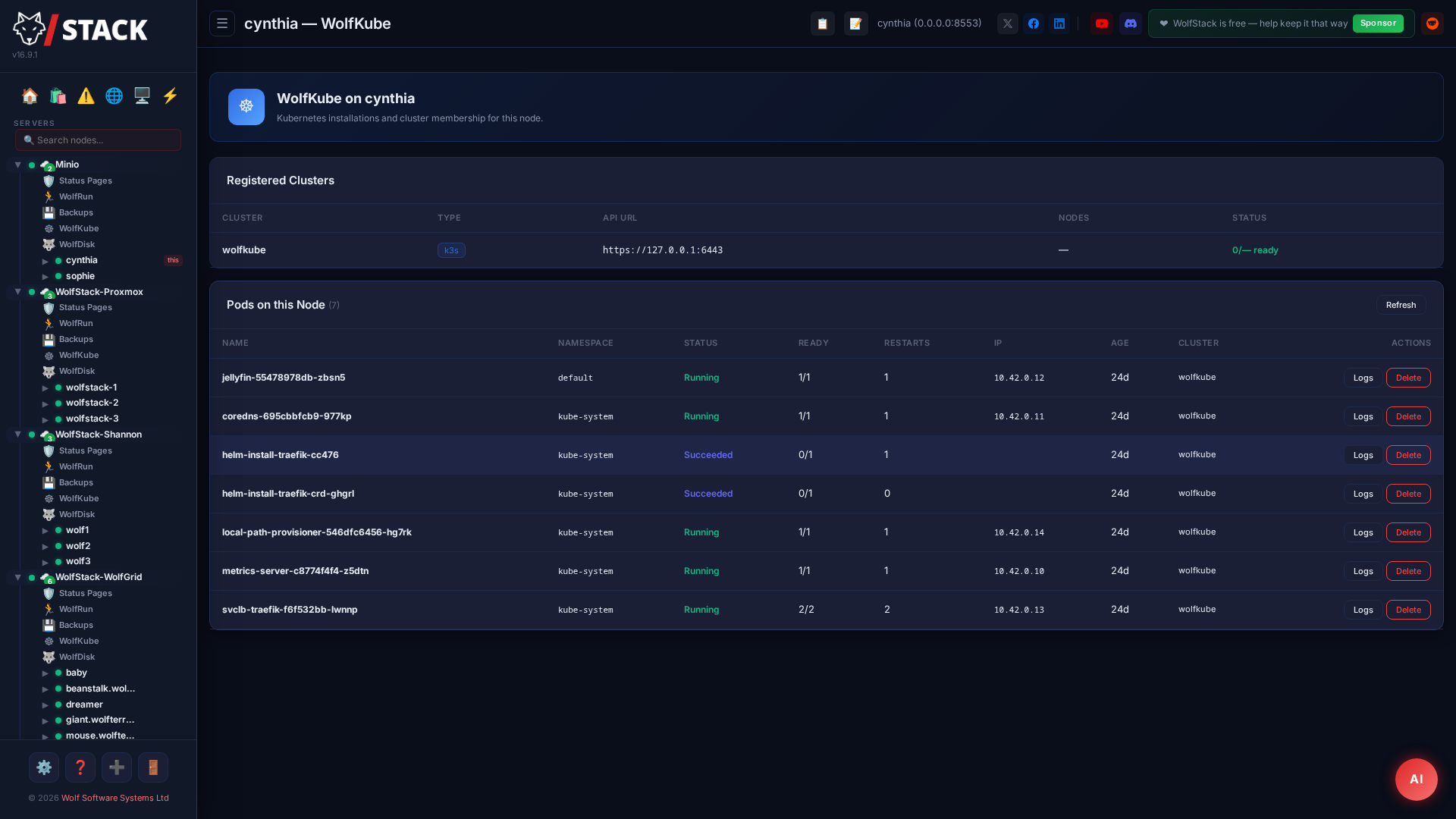
WolfKube manages your existing K8s. Point WolfStack at any cluster (kubeconfig drop-in) and pods, deployments, PVCs, and pod terminals show up next to your VMs and Docker. No replacement, no rip-and-replace.
What stays
- Your kubeconfig, kubectl, Helm charts, CI pipeline
- Your existing Deployments, Services, Ingresses, CRDs
- Your CNI, your storage class, your nodes
- Whatever runs well on K8s — runs unchanged
What you gain
- Browser UI for pods, PVCs, deployments — with exec/terminal
- The other 80% of your fleet (VMs, LXCs, Docker) in the same dashboard
- App Store deploys for the workloads that don’t deserve six YAML files
- Backups, alerting, status page that already cover Docker + KVM + LXC
The point: You stop paying the K8s tax on workloads that never needed it — without giving up K8s where it pays off.
WolfStack alongside Proxmox
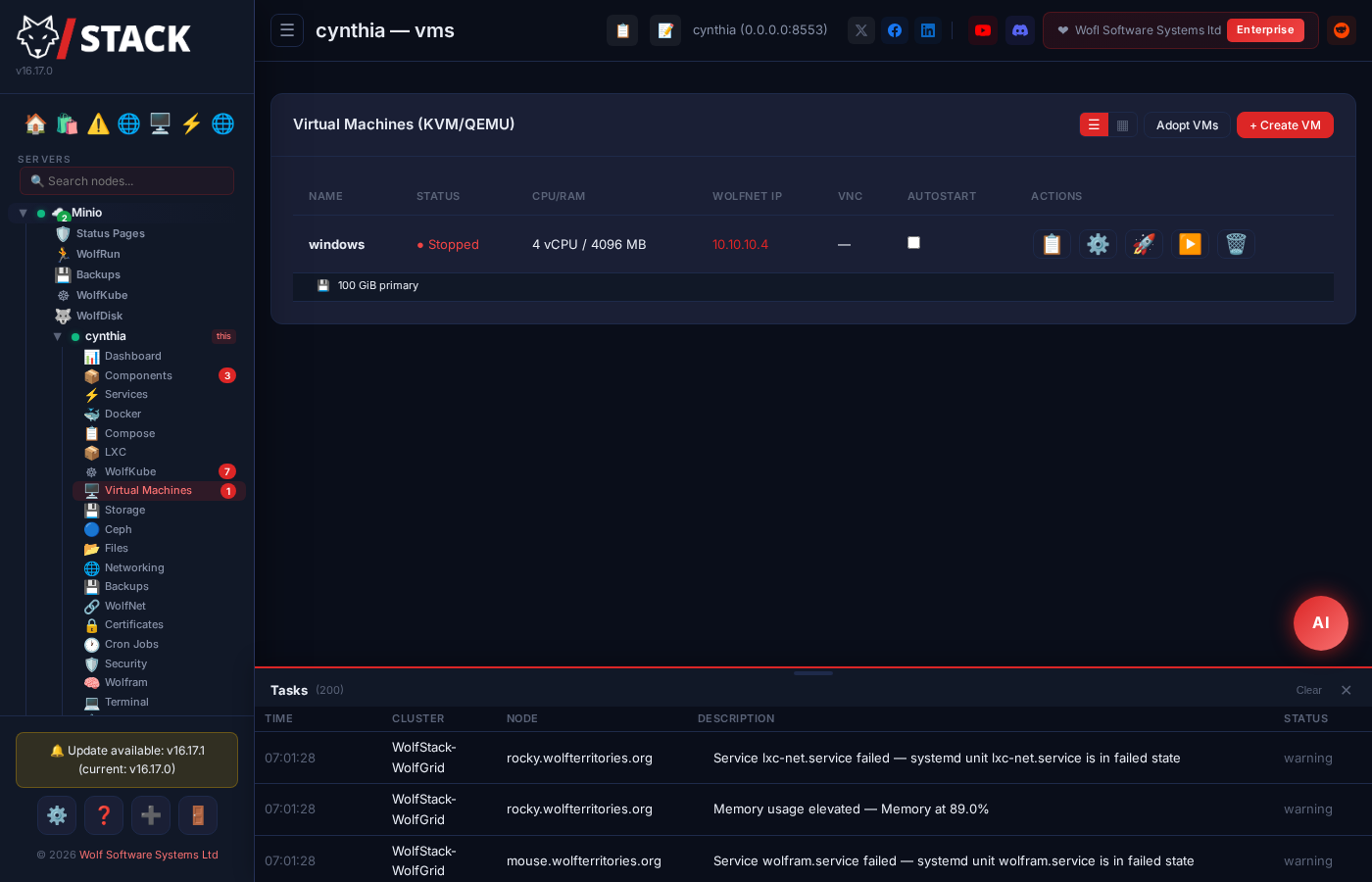
If you’re already running Proxmox you don’t need to migrate to anything. Install WolfStack on each Proxmox node and it adopts what’s already there — same VMs, same LXCs, same storage — while adding Docker management, unified backups, networking, and a single dashboard across the cluster.
No migration. No reformat. No new hypervisor. WolfStack reads your existing Proxmox config and shows your VMs and LXCs in the dashboard immediately. Carry on using pveproxy if you want to — both UIs work side-by-side.
What stays
- Proxmox VE itself, the Proxmox UI,
qm/pct - Your existing VMs and LXCs — ID-for-ID
- Your storage pools, ZFS, Ceph
- Your
vzdumpbackups (still work)
What you gain
- Docker container management with the same UI as your VMs
- One dashboard across multiple Proxmox nodes — no PVE cluster required
- Backups that cover Docker volumes + bind mounts, alongside
vzdump - WolfRouter + WolfNet to wire VM, container, and physical networks together
- Built-in alerting + public status page — no extra tool
The point: Keep Proxmox. Stop bolting on three other tools to fill in the gaps.
WolfStack on top of your Docker hosts
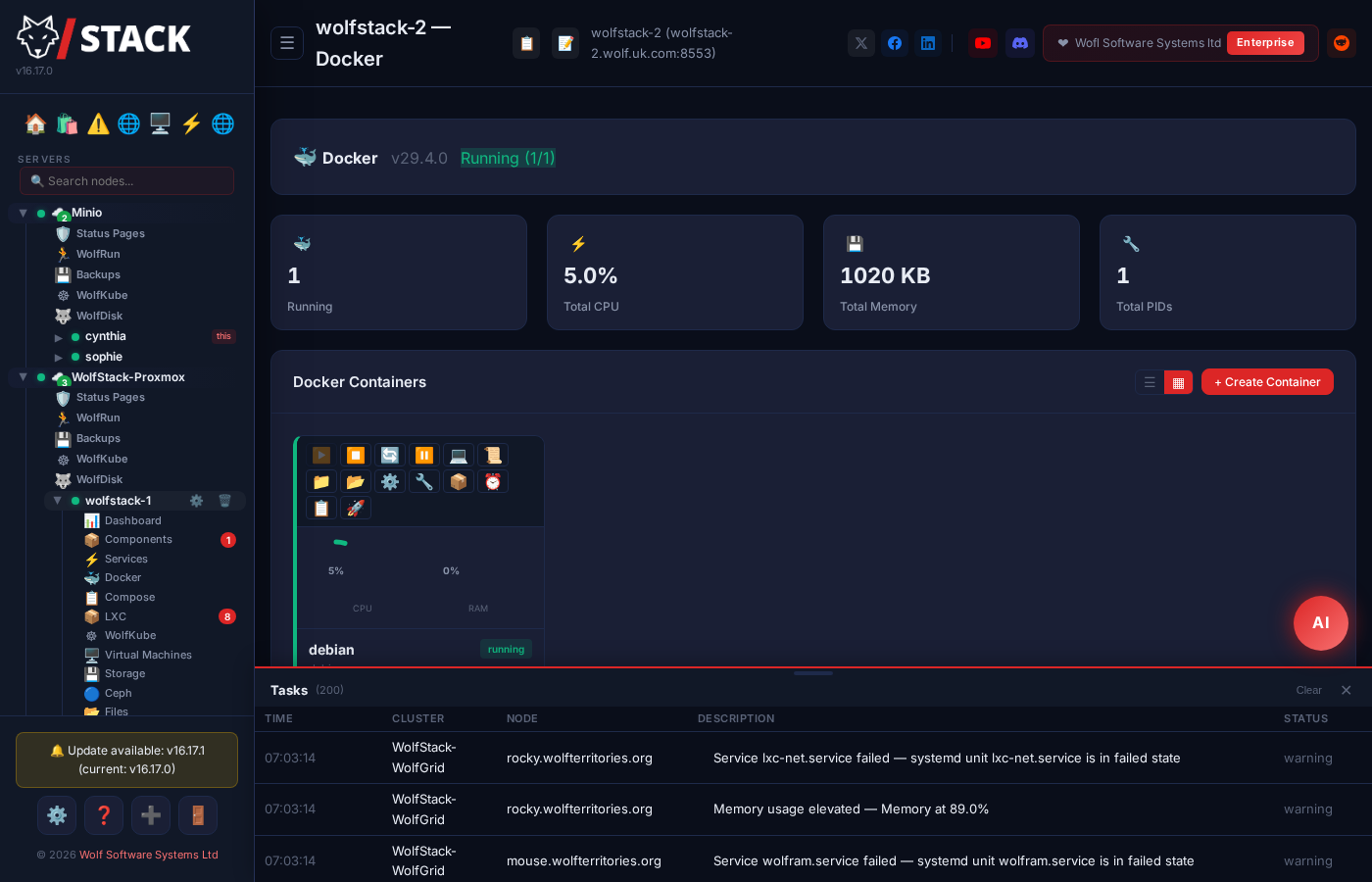
If you’re running Docker today and managing it through SSH and bash history, the goal isn’t to change how you run containers — it’s to stop running them blind. WolfStack installs on the same hosts your Docker daemon is on. Your existing containers, images, networks, and compose files all show up immediately. No re-pulls, no re-tagging, no downtime.
Your existing docker setup is unchanged. WolfStack talks to the local Docker socket. Containers you started with docker run or docker compose up appear in the UI within seconds, with their logs, networks, and volumes intact.
What stays
- Your Docker images, compose files, registries
- Your running containers (no re-pull, no re-create)
- Your bind mounts, named volumes, networks
- SSH still works the same.
dockerCLI still works the same.
What you gain
- Every container across every host on one screen — from a browser, on a phone if you have to
- Backups with receipts: Docker volumes and bind mounts, scheduled, restorable from UI
- Per-container log tails and exec without SSHing in
- Threshold alerts to email/Discord/Slack/Telegram — before customers tell you
- A public status page customers can check instead of emailing you
- Onboard a teammate in an afternoon — give them a login, not a Notion page
The point: Same Docker. Just stop running it blind.
Feature-by-feature comparison
If you want the receipts — here’s the full table against Proxmox, Kubernetes, Portainer, CasaOS, and Cockpit.
Container & VM Management
| Feature | WolfStack | Proxmox | Kubernetes | Portainer | CasaOS | Cockpit |
|---|---|---|---|---|---|---|
| Docker Containers | Yes | Limited | Yes | Yes | Yes | Plugin |
| LXC System Containers | Yes | Yes | No | No | No | No |
| KVM/QEMU Virtual Machines | Yes | Yes | No | No | No | Basic |
| Libvirt/virsh Integration | Yes | No | No | No | No | Yes |
| Proxmox VE Integration | Yes | Native | No | No | No | No |
| Physical NIC Passthrough | Auto-bridge | Manual | No | No | No | No |
| VM Serial Terminal (all backends) | Yes | CLI only | N/A | N/A | N/A | No |
| Graceful VM Shutdown (ACPI) | Default | Yes | N/A | N/A | N/A | No |
| VM Apps via App Store (ISO installers) | Yes (PBS, etc.) | No | No | No | No | No |
| Container Clone & Migrate | Yes | Yes | No | No | No | No |
| Container Cron Jobs | Yes | No | CronJobs | No | No | No |
| Docker Image Management | Yes | No | No | Yes | No | No |
Orchestration & High Availability
| Feature | WolfStack | Proxmox | Kubernetes | Portainer | CasaOS | Cockpit |
|---|---|---|---|---|---|---|
| Container Orchestration | WolfRun | No | Yes | Swarm | No | No |
| Container Failover (HA) | Standby HA | HA (paid) | Yes | Swarm HA | No | No |
| Kubernetes Management | WolfKube | No | Native | Paid | No | No |
| Pod Terminal & Monitoring | Yes | No | CLI only | Yes | No | No |
| K8s PVC Storage | Yes | No | CLI only | Paid | No | No |
| Multi-Server Clustering | Yes | Yes | Yes | Paid | No | No |
Networking, Security & Authentication
| Feature | WolfStack | Proxmox | Kubernetes | Portainer | CasaOS | Cockpit |
|---|---|---|---|---|---|---|
| Built-in User Accounts | Yes | Linux/PAM | RBAC | Yes | Yes | Linux/PAM |
| Two-Factor Auth (2FA/TOTP) | Yes | Yes (paid) | No | No | No | No |
| Disable Linux Login | Yes | No | N/A | N/A | No | No |
| Login Rate Limiting | Yes | Yes | No | No | No | No |
| Encrypted Mesh Network | WolfNet | No | CNI plugins | No | No | No |
| Built-in VPN | WolfNet VPN | No | No | No | No | No |
| WireGuard VPN Bridge | Yes | No | No | No | No | No |
| Firewall Management | Fail2ban & UFW | Firewall | No | No | No | Firewalld |
| SSL/TLS Certificates | Let’s Encrypt | Let’s Encrypt | cert-manager | No | No | Certbot |
| Nginx/Apache Configurator | Yes | No | No | No | No | No |
Storage
| Feature | WolfStack | Proxmox | Kubernetes | Portainer | CasaOS | Cockpit |
|---|---|---|---|---|---|---|
| S3/R2 Object Storage | Yes | No | CSI | No | No | No |
| NFS Mounts | Yes | Yes | PVC | No | No | No |
| SMB/CIFS Mounts (Synology/QNAP) | Yes | No | PVC | No | No | No |
| SSHFS | Yes | No | No | No | No | No |
| Ceph Management | Yes | Yes | Rook | No | No | No |
| ZFS Management | Yes | Yes | No | No | No | No |
| Disk Partitioning & SMART | Yes | No | No | No | No | Basic |
| Backup & Restore | S3, NFS, SMB, PBS, Local, WolfDisk, Remote | PBS | Velero | No | No | No |
Monitoring, Tools & UI
| Feature | WolfStack | Proxmox | Kubernetes | Portainer | CasaOS | Cockpit |
|---|---|---|---|---|---|---|
| Web Terminal | Yes | Yes | No | Yes | No | Yes |
| File Manager | Yes | No | No | No | Yes | No |
| Cluster Browser (in-cluster Firefox, no VPN) | Yes | No | No | No | No | No |
| Internal Service Auto-Discovery | 25+ apps | No | No | No | No | No |
| App Store | 530+ apps | No | Helm | Yes | Yes | No |
| AI Assistant (chat in dashboard) | Claude / Gemini / OpenRouter / Local | No | No | No | No | No |
| Named AI Agents (per-agent memory + persona) | Unlimited | No | No | No | No | No |
| Agent Tool Use (inspect + act on the cluster) | 20+ tools | No | No | No | No | No |
| Agent Access Levels (read-only / confirm / trusted) | Yes | No | No | No | No | No |
| Operator Approval Queue for destructive agent calls | Yes | No | No | No | No | No |
Hardcoded Safety Denylist (rm -rf / etc.) | Yes | — | — | — | — | — |
| Discord / Telegram / WhatsApp Agent Bridges | All three | No | No | No | No | No |
| Agents can Send Email (own SMTP, scoped recipients) | Yes | No | No | No | No | No |
| Agents can Schedule Tasks (natural-language → cron) | Yes | No | No | No | No | No |
| Main Chat Drafts Agents from Natural Language | Yes | No | No | No | No | No |
| Agent Web Fetch / Headless Browser | Yes (SSRF-guarded) | No | No | No | No | No |
| Agent Semantic Search (past memory / audit / alerts) | Yes (BM25) | No | No | No | No | No |
| MCP Tool Surface for External Agents | Yes | No | No | No | No | No |
| Status Pages & Alerting | Yes | No | Add-ons | No | No | No |
| Workflow Automation | WolfFlow | No | No | No | No | No |
| Database Editor | MySQL & PostgreSQL | No | No | No | No | No |
| 3D VR Server Room | Yes (WebXR) | No | No | No | No | No |
| VR Terminal & Console | Yes | No | No | No | No | No |
Platform
| Feature | WolfStack | Proxmox | Kubernetes | Portainer | CasaOS | Cockpit |
|---|---|---|---|---|---|---|
| Install Complexity | 1 command | ISO install | Very complex | Moderate | 1 command | 1 command |
| Runs On | Any Linux, libvirt & Proxmox | Debian only | Any Linux | Docker host | Debian/Ubuntu | Any Linux |
| Written In | Rust | Perl/C | Go | Go | Go | Python/C |
| Single Binary | Yes | No | No | Container | No | No |
| Price | Free & Open Source | Free + Paid | Free | Free + Paid | Free | Free |
Ready to simplify?
One command, one binary, no signup. If it doesn’t click in an afternoon, you’ve lost an afternoon — not a quarter.
Source-available · no telemetry · no VC funding · no ads